


Freeya
3.678.00 Reviews
App Specs
- Version
- 1.9.0.167
- Updated On
- License
- Free
- Downloads
- 50,000+
- Developer
- Freeya Studios
- Categories
- Shopping
- Platform
- Android
Screenshots

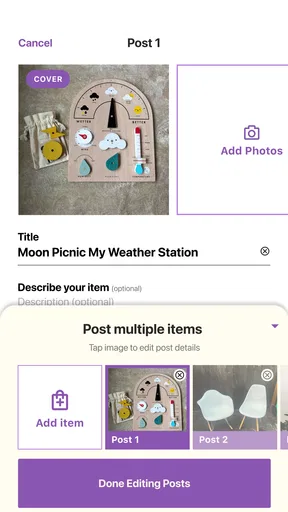
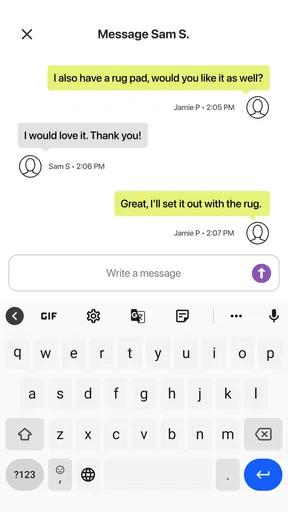
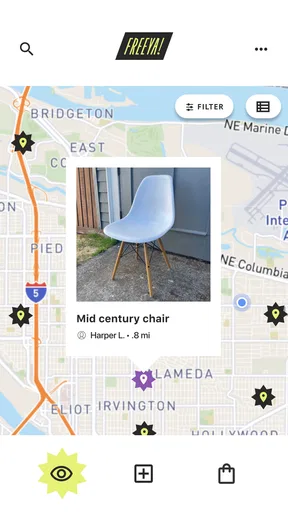
 Analysis by AppCompare
I like the idea behind Freeya: instead of treating every spare possession as something to sell, it gives neighbors a way to pass useful things along. That makes it appealing when I’m clearing a shelf, looking for a household item, or simply curious about what people nearby no longer need. It is a free shopping app from Freeya Studios, though some in-app purchases are available. Its focus is narrower than a typical marketplace, and that is both its main appeal and an important limit.
What to expect when you open it
The first impression is welcoming, and the basic path from account setup to browsing feels uncomplicated. The store information describes it as a way to get rid of unwanted belongings, but the practical value comes from the two sides of that exchange: listing an item and finding something someone else is giving away. I’d approach it as a local sharing space, not as a replacement for every shopping or selling app on my phone.
For speed, I would keep expectations sensible. Browsing and searching are the kinds of tasks that should feel direct in an app like this, but the useful part of a listing depends on the details people add and on whether nearby users respond. A quick search can reveal possibilities; arranging a handoff is still a human process. The app can help make the connection, but it cannot make an item appear at the right time or guarantee that a conversation moves quickly.
When a listing takes more effort
The app’s busiest moments are likely to come when I’m doing more than scrolling: photographing a few items, writing descriptions, deciding what to give away, and keeping track of interest. That is where a little preparation helps. I’d group objects by type before listing them, take clear photos in good light, and describe wear or missing parts plainly. Better listings reduce the back-and-forth and help someone decide whether a pickup is worth arranging.
There is also a trade-off in giving things away rather than selling them. I don’t have to negotiate a price, which keeps the exchange simple, but I also shouldn’t expect to recover money for an item with resale value. If I’m clearing out usable everyday goods and want them to find a new home, the no-sale approach makes sense. If I need cash, or I’m parting with something valuable, a conventional resale marketplace is probably the better fit.
Reliability depends on the local exchange
I would judge the experience by more than whether the app opens smoothly. A useful local listing needs an interested person, clear communication, and a pickup plan that works for both sides. Those are ordinary uncertainties in community exchanges, not something an app can remove. I’d avoid setting aside an item indefinitely for a vague promise; a concise message about timing and a clear arrangement make the process more dependable.
That distinction matters if I’m trying to clear space on a deadline. Freeya can help connect an item with someone who wants it, but I wouldn’t treat it as guaranteed same-day removal. For a quick cleanout, donation collection or another established disposal route may be more predictable. For items that can wait for a neighbor who genuinely wants them, the app’s sharing-first approach is more satisfying.
Worth Reading Before You Choose

Flipboard Shows What News Apps Must Do Beyond the Feed

Switching to Android Auto Means Rethinking Your Driving Routine

Google Calendar Makes a Crowded Week Easier to Manage

Ludo King Makes the Most of the Minutes Between Plans

Baby Panda World Brings Quick Play to Modern Phones, but Its Game Library Feels Busy

ESPN’s Live Game View Makes Following Close Games Easier
Device fit and everyday use
The app is listed for devices running Android 8.1 or later, so an older phone may be a constraint even if it still handles basic tasks well. I’d also consider the practical side of using any photo-based local marketplace: taking and reviewing pictures, composing descriptions, and checking messages are more comfortable on a device that remains responsive during ordinary multitasking. I can’t infer exact battery use or storage demands from the version information alone, so I’d make those judgments on my own device rather than assume it is especially light or demanding.
The current version is 1.9.0.165. Keeping an app current is a sensible step if I run into an issue, but version numbers alone do not tell me how stable it will be on a particular phone. If a screen seems stuck, I’d first try closing and reopening the app and checking my connection before repeating a listing or message. That simple pause can help avoid accidental duplicate actions when an exchange is already in progress.
Who will get the most from it?
I think Freeya is best for people who have practical items to pass on and are comfortable coordinating locally. It particularly suits someone who is decluttering gradually rather than emptying an entire home at once. A few well-described objects are easier to manage than a flood of listings, and the slower pace can be an advantage: I can make considered choices about what is useful to someone else instead of rushing everything into a sale or bin.
It is less suitable if I want a guaranteed buyer, a set price, delivery, or a tightly scheduled removal. Those needs point toward resale platforms, retail stores, or formal donation services, depending on the item. It may also disappoint someone who expects a large catalogue of exactly what they want. Community sharing is naturally shaped by what other users choose to list, so patience and flexibility matter more than they would when browsing a conventional online shop.
Freeya is rated 3.6 on average from 251 ratings, with 78 written reviews and more than 50,000 installs. Those figures give me some context, but they don’t tell me whether the people near my home are actively using it. Local participation is the more practical question: an app can be easy to understand and still have limited value if there are few nearby listings or interested users. I’d browse the available items before relying on it for a particular need.
Getting Started with Freeya
First things first, downloading Freeya is a breeze. Available on both Android and iOS, all you need to do is head to your respective app store and hit that download button. Once installed, you'll be greeted with a clean and friendly interface that's super easy to navigate. Creating an account took me less than a minute, and I was ready to dive into the world of giving and receiving.
The Joy of Giving
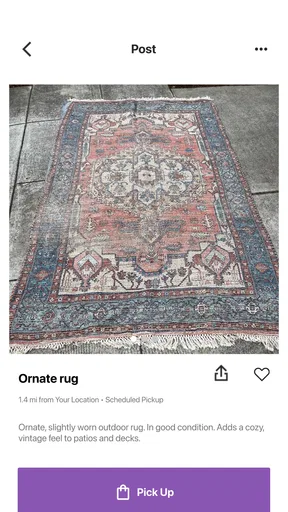
One of the best aspects of Freeya is its focus on community sharing. Got a pair of jeans that don't fit anymore or a book you've already read? Simply snap a picture, write a quick description, and list it. The app encourages you to let go of items you no longer need without any monetary exchange, which feels surprisingly liberating.
Listing items is straightforward. I appreciated the option to add tags and categories, making it easier for others to find what they're looking for. Plus, you can set a pickup location that's convenient for you, streamlining the whole process.
Discovering Hidden Gems
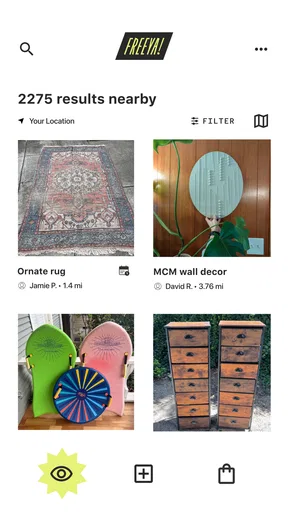
On the flip side, browsing items from others is equally exciting. The app's search function is intuitive, allowing you to filter by category, distance, and even specific keywords. Personally, I found a vintage lamp that I never knew I needed until I stumbled upon it in the app. It's like a treasure hunt every time you open it!
One cool feature is the "wishlist" function, where you can save items you're interested in and get notified if anything similar gets listed. It's a great way to keep track of what you're looking for, especially if you're hunting for something specific.
Building a Community
What really sets Freeya apart from other marketplace apps is its emphasis on community. The app encourages users to interact and build connections, fostering a sense of shared responsibility and generosity. There's a chat feature that allows you to communicate with other users, making arrangements smooth and friendly.
I found myself engaging with neighbors I never knew before, all thanks to this platform. It's a refreshing change from the usual buy-and-sell apps, as the focus here is on sharing and sustainability.
Sustainability at Its Core
Freeya isn't just about getting rid of stuff or finding new things for free; it's a movement towards a more sustainable lifestyle. By encouraging people to give items a second life, the app helps reduce waste and promotes a circular economy. It's a win-win for both users and the environment.
The app even includes educational content about sustainability and tips on how to live a greener life. For someone like me, who's always looking for ways to minimize my carbon footprint, this was a welcome addition.
A realistic way to use it
Imagine I’m sorting out a crowded kitchen cupboard on a weekend and find an extra mug set, a spare pan, and a small appliance I no longer use. I would check that each item is clean and complete, photograph them separately, and be specific about condition rather than bundling everything under one vague listing. If someone asks about the appliance, I’d confirm that it suits their needs and agree on a pickup window before putting it aside. That approach saves time for both people and makes it less likely that an interested neighbor arrives expecting something different.
For things I want to find, I’d use the wishlist for a specific need rather than checking the app repeatedly without a plan. A saved interest can make it easier to keep track, while category and distance filters help narrow browsing. The trade-off is that waiting for a particular item may take patience; if I need it immediately, buying from a shop or a larger marketplace is more dependable.
Small choices that make exchanges smoother
A photo and short description are not just posting chores; together they answer the questions a recipient is likely to ask. I’d include visible condition, whether the item is complete, and any detail that affects carrying or pickup. For instance, a bulky object calls for a different plan than a book, so I would settle the practical handoff before confirming. This is a useful habit even when the app’s interface makes listing feel quick.
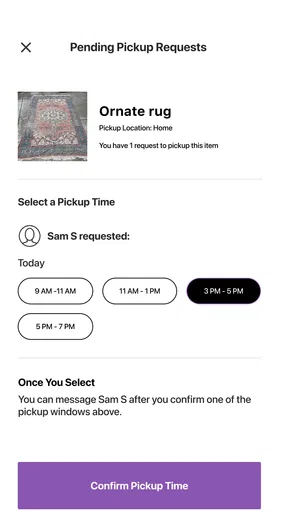
I’d also treat the pickup location as a privacy decision, not merely a convenience setting. Choosing a location that feels comfortable and agreeing on a clear time can make an exchange easier to manage. The app’s local focus is valuable precisely because it can connect nearby people, but that does not mean I should share more personal detail than a handoff requires.
Free to start, with a focused purpose
The app is free to download, while in-app purchases range from $0.99 to $19.99 per item. I would decide whether any optional purchase is worthwhile only after using the basic sharing workflow and understanding what I personally need. The Teen content rating is another simple point for households to keep in mind, especially if a younger family member uses shopping apps.
Compared with a broad buy-and-sell marketplace, Freeya’s strongest distinction is the emphasis on giving items away rather than putting a price on every exchange. That can remove bargaining and make useful things accessible, but it also means the app is not designed around earning money from unwanted possessions. Compared with arranging a giveaway through a neighborhood group, a dedicated app can keep browsing and item discovery in one place; the local response still depends on who is active nearby.
Where it fits in a more sustainable routine
I wouldn’t expect one app to solve decluttering by itself. What makes this kind of sharing useful is the small decision to check whether someone else can use an item before throwing it away. Freeya can support that habit, particularly for everyday objects that are still in good condition. It is not a substitute for responsible disposal when something is broken, unsafe, or unsuitable for reuse; in those cases, I’d choose an appropriate recycling or disposal option instead.
Its sustainability angle is most convincing when it changes what I do with an item, not when it becomes another reason to collect things. I’d use the app to pass on something I already own, rather than browsing just because free items are tempting. That keeps the exchange practical and makes the second life of an object the point, rather than simply bringing more belongings into the home.
Final Thoughts
Overall, my experience with Freeya has been nothing short of delightful. It's rare to find an app that combines practicality with a genuine sense of community, all while promoting sustainable living. Whether you're looking to declutter or discover, Freeya offers a platform that's easy to use and rewarding in more ways than one.
So, if you're ready to join a community of like-minded individuals who believe in the power of giving, why not give Freeya a try? Who knows, you might just find your next favorite item or make a new friend along the way!
My performance verdict
My practical verdict is that Freeya’s value is less about raw speed and more about whether it makes the local give-and-take easy enough to repeat. The browsing, saved interests, listings, and messages each serve a clear purpose, but successful exchanges still rely on useful descriptions and responsive people. I’d use it for a few thoughtful listings or a flexible search, not as a guaranteed fast-clearance service.
If you enjoy passing things on, can coordinate a pickup, and are open to what your community happens to offer, it is worth trying. If you need firm delivery, immediate availability, or money back for your belongings, another route will suit you better. For me, that distinction makes the app’s promise clearer: it works best as a neighborhood sharing tool, with real-world timing and participation setting the pace.
Pros
- User-friendly interface for seamless navigation.
- Wide variety of categories to explore.
- Efficient search functionality enhances experience.
- Regular updates keep content fresh and relevant.
- Offline access available for convenience.
Cons
- Limited free features in the basic version.
- Occasional ads can interrupt usage.
- Some features require a stable internet connection.
- Customer support response can be slow.
- Not all content is available in every region.
FAQs for Freeya
What is Freeya and what can I do with it?
Freeya is a versatile app designed to facilitate the exchange of goods and services without monetary transactions. Users can list items they no longer need and browse for items they want, promoting a sustainable and community-driven approach to resource sharing. It's perfect for those looking to declutter or find items without spending money.
Is Freeya available for both Android and iOS devices?
Yes, Freeya is available for download on both Android and iOS platforms. Users can find the app on the Google Play Store for Android devices and the Apple App Store for iOS devices. This ensures broad accessibility for users regardless of their preferred mobile operating system.
How secure is my personal information on Freeya?
Freeya prioritizes user privacy and employs robust security measures to protect personal information. The app uses encryption and secure protocols to safeguard data. Users are encouraged to review the app's privacy policy to understand how their information is handled and to take personal precautions when sharing items or meeting with other users.
Are there any fees or costs associated with using Freeya?
Freeya is designed to be a free platform, allowing users to exchange items and services without any monetary cost. There are no hidden fees or premium subscriptions required to access its core features. However, users should be aware of any data charges from their mobile carrier while using the app.
What should I do if I encounter a problem or issue on Freeya?
If you encounter any issues while using Freeya, the app provides a support section where you can report problems directly. Additionally, users can access FAQs and troubleshooting tips within the app. For unresolved problems, contacting customer support through the app's help section is recommended for prompt assistance.


